Announcing: Event Types
Structured annotations for robotics data.

Robots do not fail on a schedule. When something important like a safety stop or a perception glitch happens, you need a way to mark the exact time range in the logs and easily access the associated sensor data. Time annotations support a wide range of operational needs related to triage, debugging, and model training.
Events are Foxglove’s way to annotate time ranges of data. Today we are launching a major upgrade to Events across the Foxglove Data Management and Visualization workflows, built around Event Types and typed properties.
This post covers what changed, why it matters for developers, and how to use it.
Why Events?
Most teams already have some notion of “incidents” in spreadsheets, tickets, or internal tooling. The problem is that those systems are usually disconnected from the data you need to debug. Events bring those answers into the same place you play back and analyze robotics data: a specific recording, an exact time range, and the context you’ll want later when you’re triaging issues or measuring trends.
Events are general-purpose bookmarks. They can be used by individual developers for personal references, operators to make notes in the field, verification and validation systems to programmatically tag data, or ML & AI teams to curate examples of data for training and algorithm design. They unlock a range of common developer workflows such as:
- Debugging and root cause analysis: “Show every localization loss that preceded an autonomy disengagement”
- Regression tracking: “Did safety stops spike after we changed planner parameters?”
- Dataset curation: “Collect 200 examples of perception flicker in rain, labeled with severity”
- Fleet and field notes: “Operator intervention because of construction zone, include a link to the ticket”

Event Types and Properties: schemas for event metadata
Event Types are the core of the new Events experience: they define a named template with an ordered set of typed properties and a color. They let you define a consistent schema and coherent organizational system for recurring situations your team tracks, so your “Safety stop” events and your “Localization loss” events all look the same regardless of who created them.
Property values can be typed as strings (including multiline notes), numbers, booleans, single-select values, or multi-select values. URL strings are rendered in the app as clickable links, so you can easily cross-reference events with bug trackers and other external databases. You can also mark properties as required.
Event type schemas and properties are validated in the app and in the API, which ensures that critical information is stored consistently. This gives you:
- Consistency: “Safety stop” is spelled the same every time
- Structure: Fields like severity, subsystem, environment, and ID can be ordered and validated
- Machine-friendly metadata: easy to filter, aggregate, and export
Better ergonomics in Visualization
Events are now deeply integrated into the Viz playback experience. Selecting an event opens its details in the right sidebar so you can quickly browse context without immediately entering an editing flow. When you do need to refine something, switching into edit mode is straightforward and stays in the same place.
The timeline annotation experience has also been reworked so it’s easier to create and adjust event bounds during playback. Simultaneous and overlapping events are stacked so they are all visible. Events drag naturally, snapping behavior is predictable, and the UI is designed to stay responsive even with large event volumes. And the event timeline view can be collapsed to save screen real estate when it’s not needed.
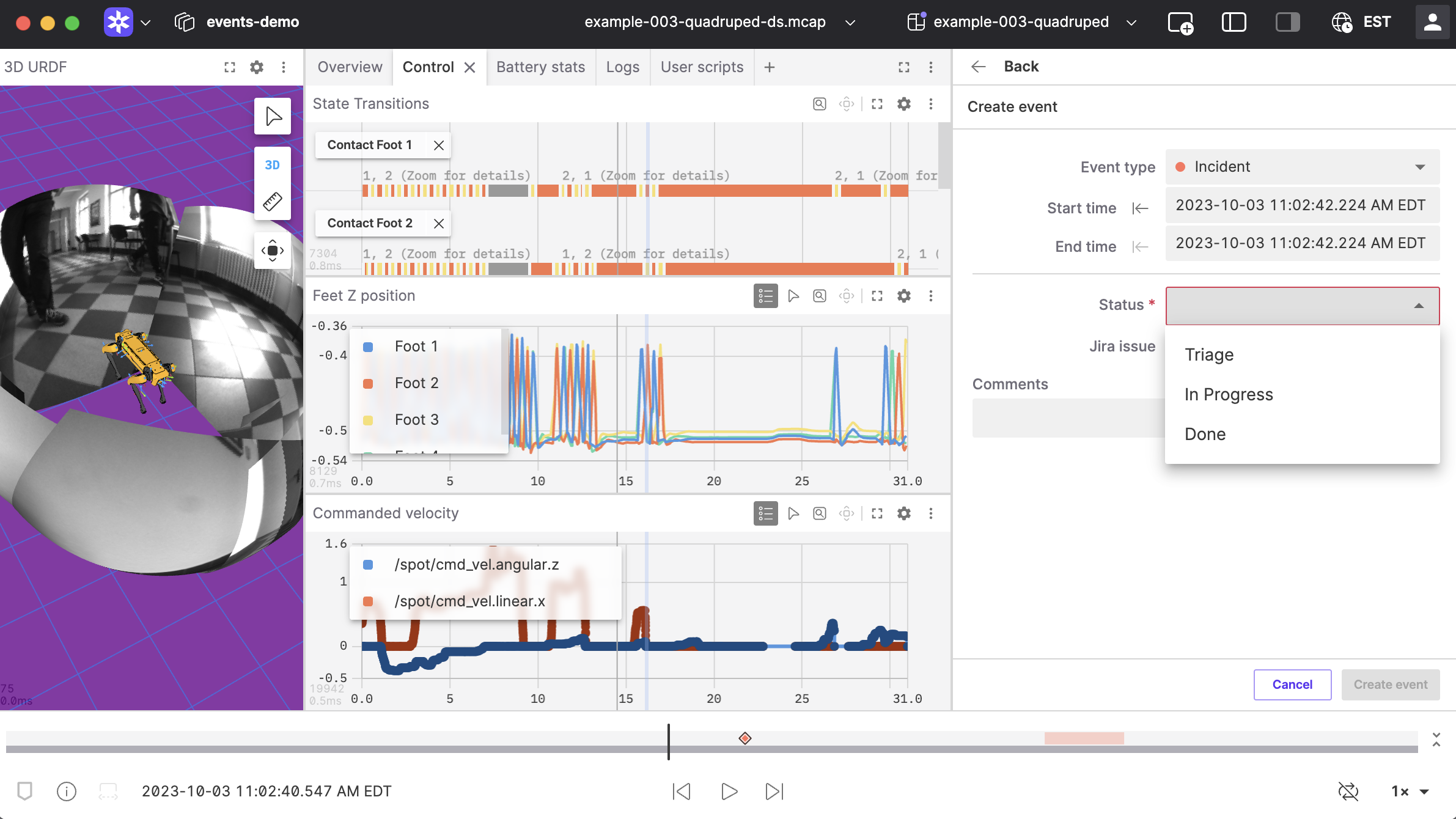
Below is an example of creating an “Incident”-type event for a period of time where sensor data was missing. Note how the playback head can be used as a cursor for precisely locating start and end-times.
Search and filtering that scales with real usage
As Events become more central to your workflows, finding the right subset quickly matters. The updated Events experience supports searching across untyped metadata, typed properties, or both, depending on what you’re trying to do. You can also filter by event type to focus on a specific category, and filter by event ID when you need to jump directly to a known event referenced in another system.
The new events experience provides a smoother annotation flow for individuals and a more coherent organizational system for teams. It helps your team by defining a shared language of time annotations, allowing efficient creation of consistent events at scale.
This enables workflows like:
- “Find every Safety stop where severity=high and subsystem=motion”
- “Show typed events that link to a specific ticket”
- “Export all Operator intervention events from the last week of field tests”
Getting started
Note that Event Types are available on Free, Pro, Academic, and Enterprise plans. However, the new event editing experience in Viz is available to all users.
If you’re already using Events, you should notice improvements immediately in both the Events pages and Viz. If you’re new to Events:
- Create an Event Types for some condition your team already tracks (for example: Safety stop, Operator intervention, Localization loss).
- Add the properties you routinely need when debugging (severity, subsystem, environment, run ID, etc.). Mark the critical ones as required.
- Start creating events as you work in Viz.
- Use search and filters to quickly retrieve the patterns you care about.
Examples: what Event Types look like concretely
For your organization, Event Types are defined globally for all users in organization settings:
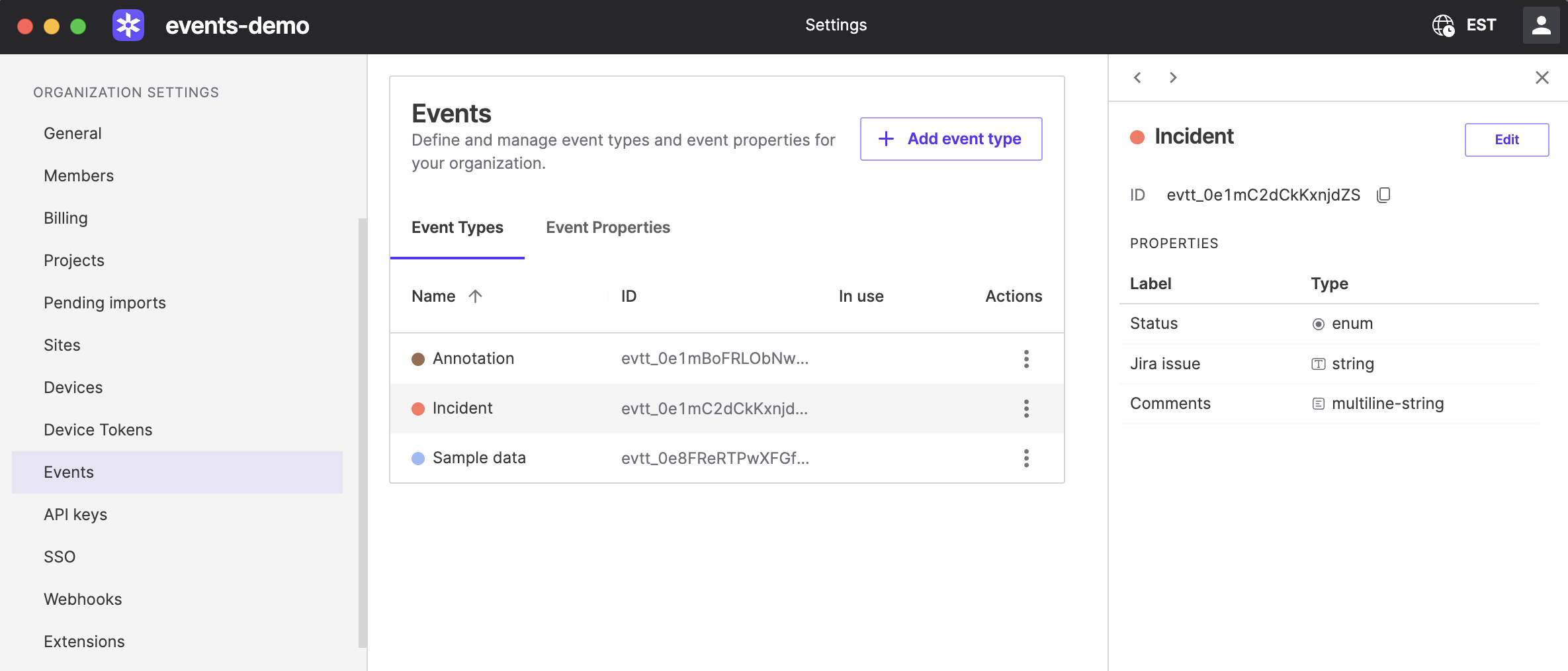
In the example above, the organization has three event types defined: Annotation, Incident, and Sample data. The Incident type in turn has three associated properties: Status, Jira issue, and Comments.
Looking at the available types through the Foxglove API would show something like:
❯ curl -X GET "https://api.foxglove.party/v1/event-types" -H "Authorization: Bearer $FOXGLOVE_API_TOKEN" | jq[
{
"id": "type_id_1",
"name": "Incident",
"colorName": "red",
"customProperties": [
{ "id": "prop_id_1", "required": true },
{ "id": "prop_id_2", "required": false },
{ "id": "prop_id_3", "required": false }
],
...
},
...
]Properties are defined separately, and can be shared across multiple Event Types:
❯ curl -X GET "https://api.foxglove.party/v1/custom-properties" -H "Authorization: Bearer $FOXGLOVE_API_TOKEN" | jq[
{
"id": "prop_id_1",
"key": "status",
"label": "Status",
"resourceType": "event",
"valueType": "enum",
"enumValues": [
"Triage",
"In Progress",
"Done"
],
"hasAssociatedData": true
},
...
]At this point, Events can be associated with a Type and its associated Properties either in the app or through the API:
You can also migrate existing events to use types using the Events API. Note that it is strict about enforcing schemas and property types, so you will need to ensure that the metadata conforms to the new schema when you update the event.
What’s next?
We’re excited about where Events can go: more automation, deeper integrations, and better ways to summarize what happened across fleets and time.
If you have feedback, especially if you generate Events at high volume or build internal tooling on top of the Events APIs, tell us what you are trying to accomplish and what would make your workflow smoother.