Announcing Sessions in Foxglove
Organize your device data the way that makes sense.


Data collection on robotics and autonomous systems is often messy by design. Your devices split logs by file size, by time intervals, or by whatever makes sense for your hardware, but those technical boundaries rarely align with how engineers review and interact with their data.
Today, we’re releasing Sessions, a new way to organize and analyze device data in Foxglove that maps directly to how robotics developers view and analyze data.
The Problem: Technical Splits, Not Logical Ones
When you collect data from a device, or any robot running continuous operations, data gets split into multiple files for technical reasons. A self-driving car might rotate logs every gigabyte. A warehouse robot might write a new file every minute. A test platform might split recordings by hour.
These splits make sense for your system architecture (i.e. they keep file sizes manageable, align with your infrastructure, etc…), but when you come back to analyze that data, you don’t think in terms of individual files. You think in terms of meaningful operations: “This was test run #5” or “This was the experiment we ran yesterday” or “This was the stack launch from 2 PM to 4 PM.”
Traditionally, developers stitch together multiple recordings to get a complete picture. And if you wanted to compare two test runs side-by-side or feed data into a machine learning pipeline, you’d have to manually select all the relevant recordings every single time.
Sessions: Logical Grouping for Your Workflow
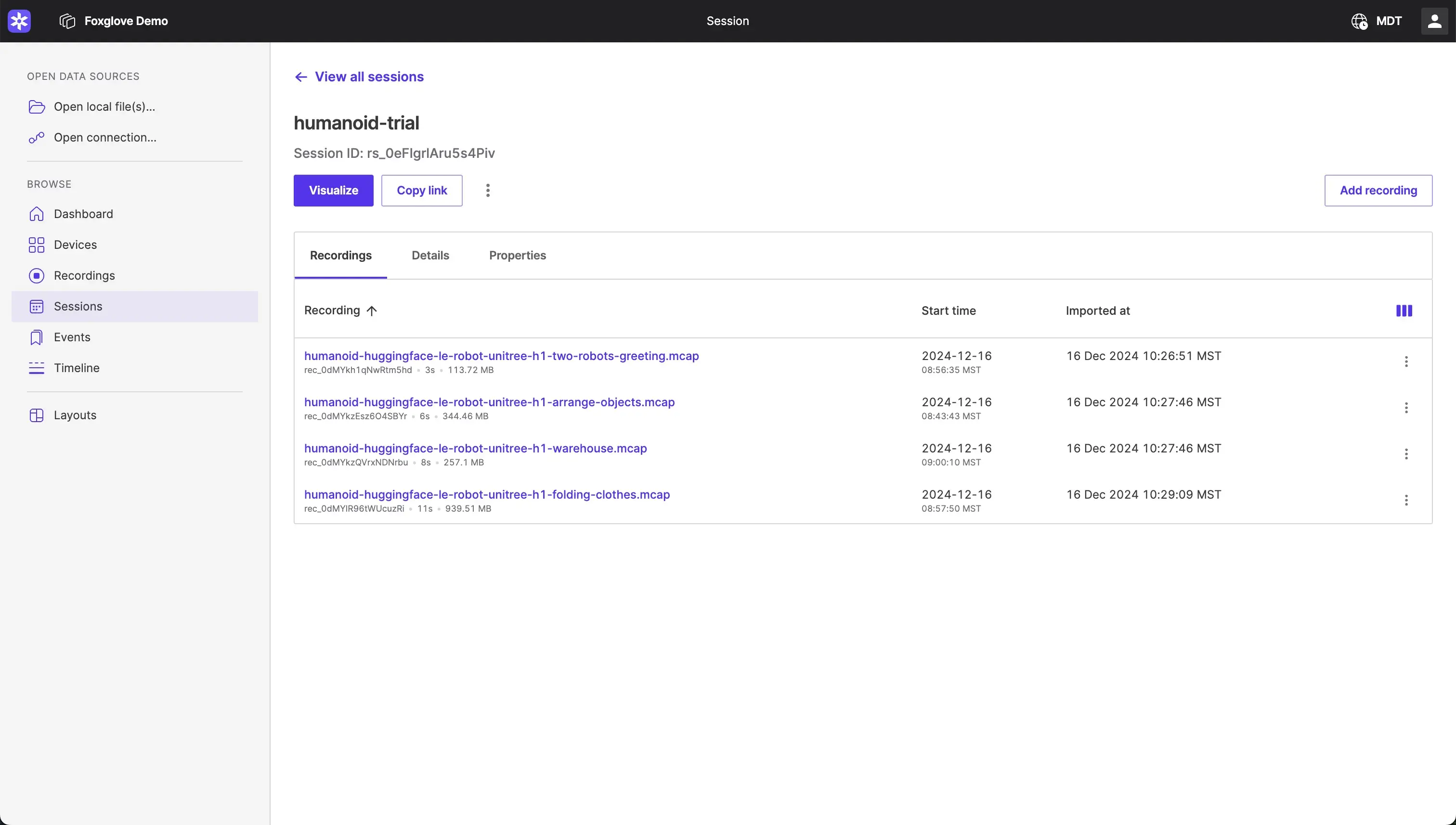
Sessions solve this by letting you define what “meaningful” means for your application. A session is a logical grouping of recordings from the same device that represents a continuous period of operation.
For teams running repeated tests, a session maps to a single test run. For a drone, a session might represent a single flight or stack launch. For an autonomous car company, it could be a complete drive or mission. You decide what makes sense for your use case.
Key Benefits
Complete Data Views Without Manual Work
Instead of hunting through individual recordings, developers get a continuous view of all data from a session. No more jumping between files or wondering if you’ve grabbed all of the relevant data.
Seamless Integration with Your Workflows
Sessions work across Foxglove’s entire platform.
- Query recordings by sessions via the Foxglove API
- Download session data programmatically for ML pipelines
- Filter and organize sessions in the UI by device, time, and metadata
- Automatically associate recordings with sessions during upload
Flexible, Real-World Mapping
Sessions don’t enforce rigid structure. Whether your session is 30 seconds or 4 days, Sessions adapt to how you actually operate. Upload critical recordings immediately while in the field, and finish the upload to the session at a later time when you have reliable connectivity.
Full ingestion workflow support
Tag sessions seamlessly whether you upload via API, web app, or cloud bucket.
How It Works
Creating a session is straightforward:
- Select a device: Sessions are tied to a specific device (robot, vehicle, etc.)
- Define your metadata: Add a key that maps to your internal identifiers so you link from internal systems.
- Add recordings: Assign recordings to the session, automatically during upload or manually after the fact.
- Visualize and analyze: Visualize all session data as one continuous dataset, download it, or query it via API
You can also create empty sessions in advance and let recordings populate them automatically as data uploads. This is perfect for continuous operations where data arrives over time.
Find more information in the docs and learn more about importing data into Foxglove.
Getting Started
Sessions are available now in Foxglove on Free, Pro, Academic, and Enterprise plans. Create your first session and start organizing your device data the way that makes sense for your team.
Download the latest Foxglove desktop app to try Sessions today. They’re available for Linux, Windows, and macOS.
Join our Discord community or follow us on X and LinkedIn to stay up to date on all Foxglove releases.