Bring Your Own Storage is now available on all major clouds
Your recordings in your own buckets on AWS, Google Cloud, and Azure.

You want to use a modern data platform to collect, organize, and debug your robotics data, but you also want to keep it in your own cloud storage. We get it. Since announcing the Bring Your Own Storage (BYOS) deployment option a few months ago, we have been working with several customers to get their production workloads on BYOS. Today we are announcing that BYOS is generally available for customers on AWS, Google Cloud, and Azure.
Why BYOS?
If you build robots, your recordings are probably already in a cloud storage bucket you own. Hundreds of terabytes of MCAP files in AWS S3 or Google Cloud Storage, and dozens of workflows stitched together with scripts pointing at these files. At the same time, you want to use the visualization, search, and curation capabilities in Foxglove. Duplicating all of your existing data into Foxglove-managed storage can be impractical.
BYOS allows you to keep your data in your own cloud storage and still benefit from our agentic data platform purpose-built for physical AI. Think of it as taking your existing data and giving it superpowers by pointing Foxglove at it.
This is also a great option for teams with stringent data residency requirements driven by security or compliance reasons. Your files remain the only copy of your recordings. Foxglove never duplicates or moves them.
How does BYOS work?
BYOS is a good middle ground between the fully managed Foxglove Cloud deployment and the operationally heavy self-hosted option. It avoids the burden of managing infrastructure for self-hosting while you keep full ownership of your data.
Your data lives in your storage buckets. Foxglove needs only read-only access to the data and indexes all your recordings in place so you can query and visualize later. The query service runs in Foxglove’s cloud, in the region you choose for the site. You have 14 regions to choose from across AWS, Google Cloud, and Azure. Point it at the region your bucket is in and every read stays local.
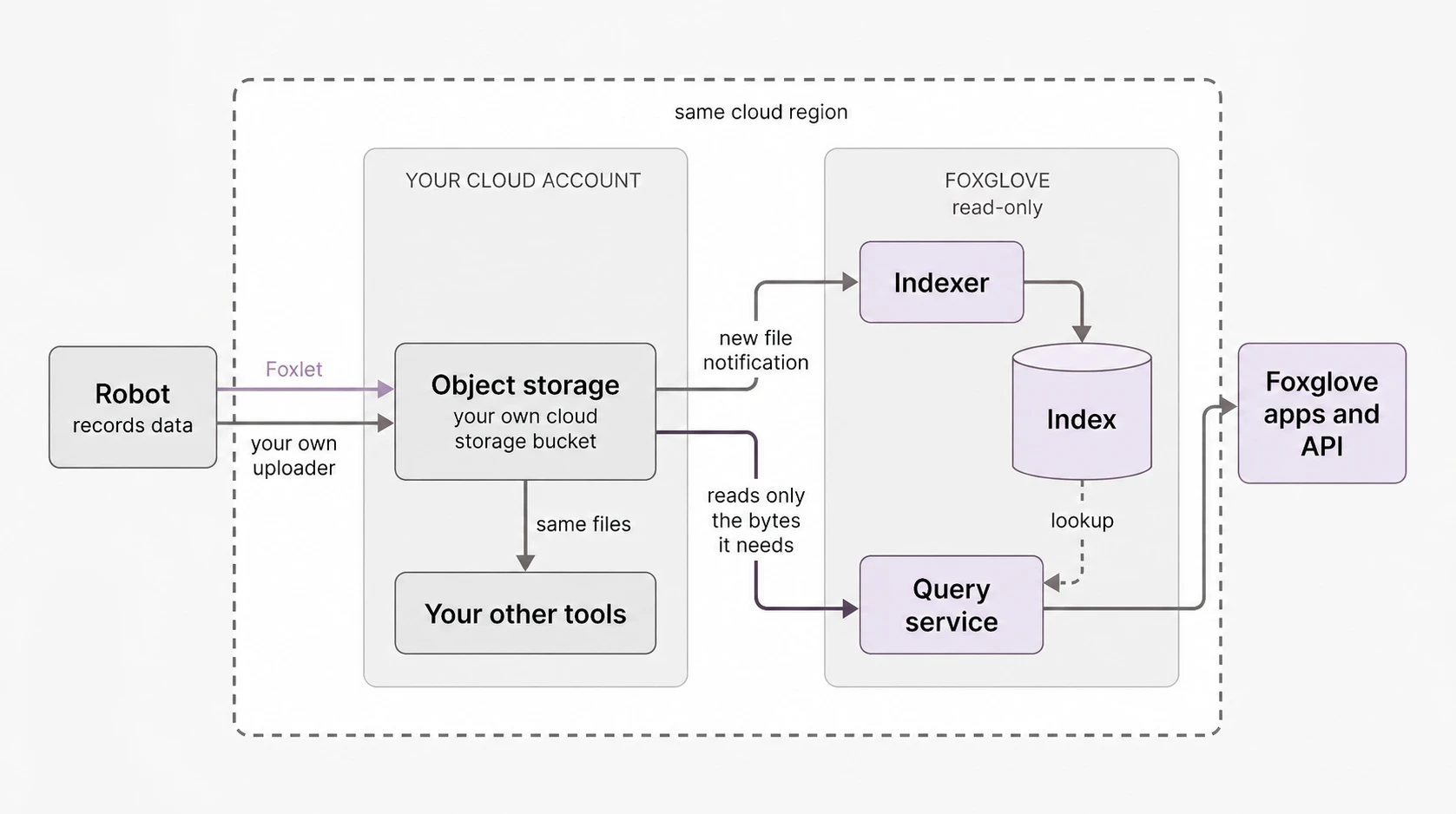
New sites come with search indexing and automatic ingestion switched on, so recordings are searchable from the moment they land. This includes searching within image and video topics using plain-language descriptions through our Semantic Search feature.
You can point a site at a bucket that already holds years of recordings and index it where it is. You can scope bucket notifications to specific file-types (MCAP and ROS 1 bag files), so you index only what you need. Any other tools written to work with your storage buckets keep working, because the underlying data never changes.
BYOS adds to our deployment options, giving you more flexibility in how you use Foxglove. This is a quick view of how the roles and responsibilities split between Foxglove and you, depending on the deployment model you choose:
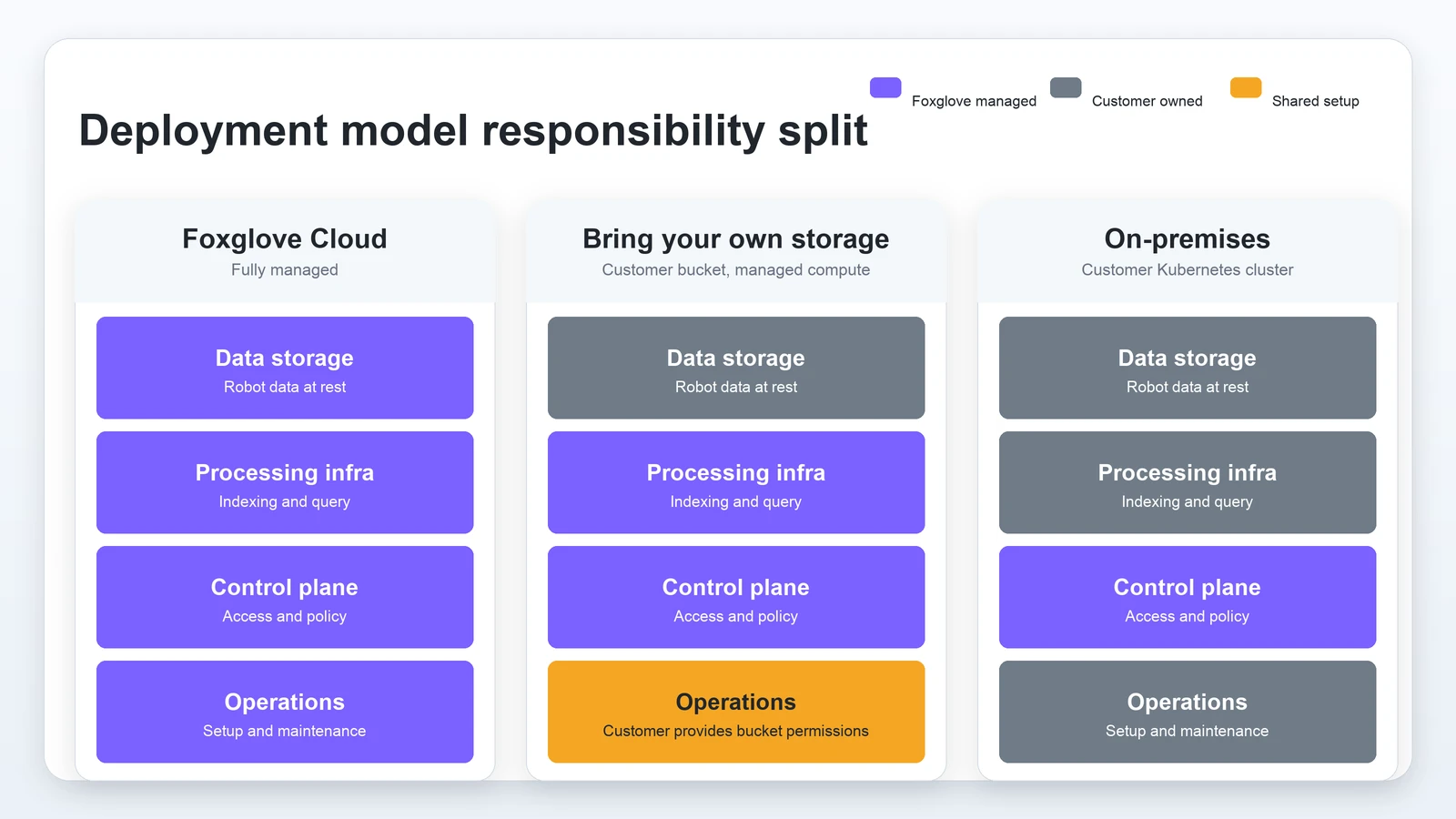
For a full list of supported deployment models, see our deployment model documentation.
Try BYOS
The BYOS deployment model is available as a paid add-on. If you want to enable this for your organization or want to learn more, please get in touch.
Once BYOS is enabled in your organization, you can follow these instructions to configure Foxglove to work with your cloud storage buckets.
Our engineers will demo these features live on September 2, 2026. Register now.