Bring Your Own Storage
Keep data at rest in your own cloud storage while Foxglove manages the compute.

Today, we’re introducing Bring Your Own Storage (BYOS), a new deployment option for Foxglove Data Platform. With BYOS, you can keep all raw data in your own cloud storage, while Foxglove manages the compute needed to index, query, and visualize at scale.
BYOS is a middle ground between Foxglove-hosted and self-managed deployments. It gives you more control over where data lives, avoids duplicating data into Foxglove, and removes the burden of deploying and operating infrastructure yourself.
What is BYOS?
BYOS lets you connect Foxglove Data Platform to an existing AWS S3, Google Cloud Storage, or Azure Blob Storage bucket. Foxglove provides a fully-managed indexing, query, and cloud visualization service (deployed in the same cloud region as your storage to minimize transfer costs), while data at rest remains fully under your control in your storage bucket.
Because Foxglove indexes recordings in-place and you no longer need to make expensive copies of data, BYOS is a natural fit to pair with our new Data Search & Curation features. You can now index petabytes of data, search and query recordings, review results, and annotate events in Foxglove, all without changing the underlying storage format or directory structure.
BYOS is a great fit for:
- Teams with existing cloud storage in MCAP or other supported formats. BYOS lets your data live in one place and be used by Foxglove and the rest of your stack.
- Organizations with heightened security or compliance requirements around data at rest that want more control over where data lives.
- Companies lacking the engineering bandwidth to deploy and manage Kubernetes clusters, configure autoscaling, and monitor additional services.
Get started in minutes, not weeks
Before today, if you wanted to deploy Foxglove in your own cloud account, you had to provision and manage a Kubernetes cluster, deploy Foxglove services, and take responsibility for autoscaling, upgrades, and maintenance operations.
With BYOS, you can now onboard in minutes:
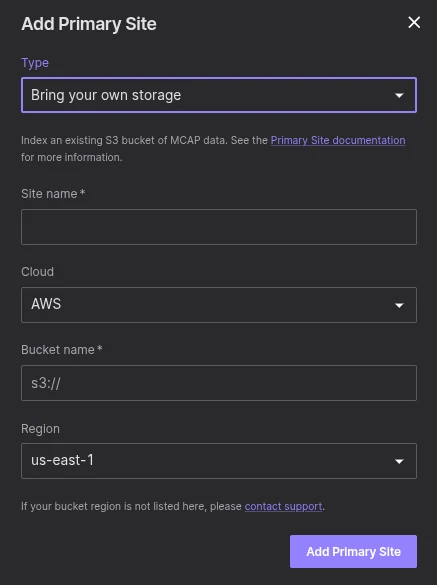
- Open organization settings and create a new storage site
- Enter your cloud provider, bucket name and region
- Grant Foxglove access to the bucket and configure notifications
That’s it! Your storage is connected to Foxglove, and you can immediately start using platform features without deploying any additional infrastructure.
Pricing
BYOS is available on our Enterprise plan. Pricing is usage-based: you only pay for what you use, across indexing, query, and bandwidth.
Get started
Read the BYOS documentation to learn more, or contact sales to get started.