PteroSim: a drone simulator built on Unreal Engine 5, JSBSim and real autopilot firmware
Why I built it and how it connects to PX4 and ArduPilot

In the following video, a swarm of eight x500 quadcopters flies through a pine forest in PteroSim. Each quad runs its own PX4 in SITL (Software In the Loop) and sees the trees only through a depth camera. The swarm planner used here is EGO-Planner.
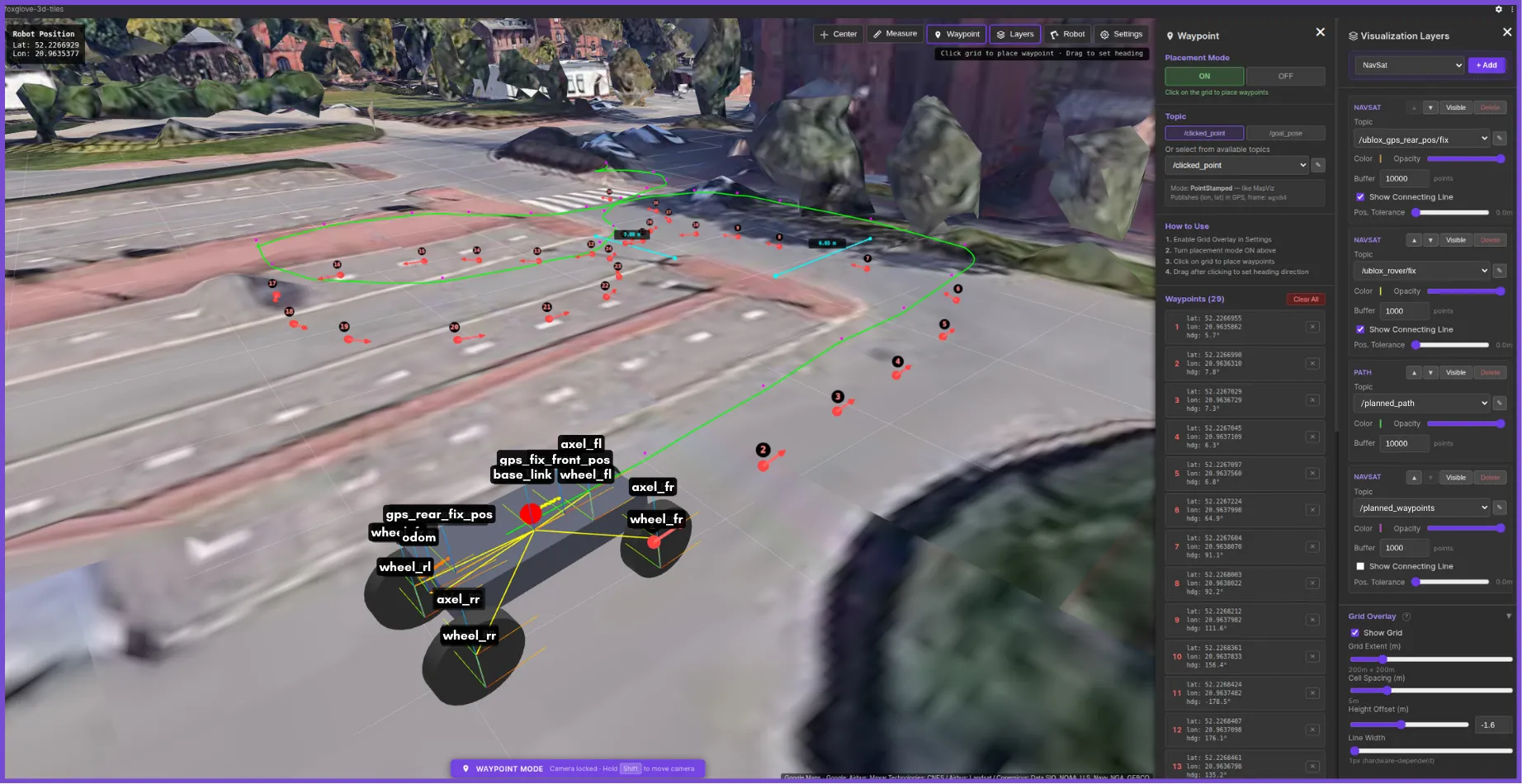
Foxglove, open next to the simulator, shows each drone’s occupancy map, all eight merged into one, and every trajectory.
PteroSim is the simulator I’ve been building at PteroLabs for the past three years. It uses Unreal Engine 5 to render the world, JSBSim to calculate flight dynamics, and the same autopilot firmware that flies real drones.
Why I built my own simulator
I started out in the simulation department of an aviation company, where the main simulator was DCS. That’s where I got hooked on testing things that don’t exist yet: you check a hypothesis in a simulator and see how well it holds up.
Years later, I worked with a company that built cargo VTOLs for hard-to-reach places like mountains and deep forests. Their aircraft had eight lift rotors, a pusher, and control surfaces, and my first task was to pick a simulator for it. Almost none focused on fixed-wing flight or could take CFD data. Microsoft AirSim was already outdated (it’s archived now), FlightGear’s graphics were dated, and the client’s team wasn’t happy with how Gazebo handled this aircraft or its graphics. The graphics mattered because the simulator was also meant to train operators who fly through the aircraft’s cameras.
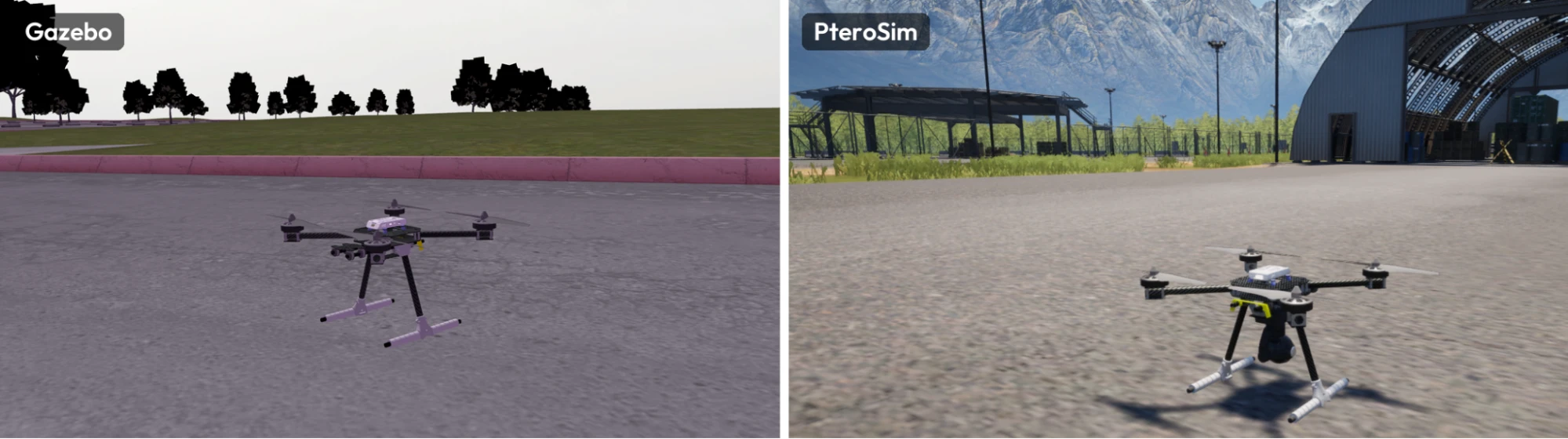
PX4’s x500 model in Gazebo (PX4’s baylands world) and in PteroSim.
X-Plane looked like the best fit thanks to its open SDK, and loading the model, spawning it, and connecting PX4 went smoothly. The trouble started when we needed the flight path as a 3D line in VR. The client wanted everything on Linux, so X-Plane, VR, and PX4 had to run together through Docker. X-Plane 12 had no 3D drawing, so I drew the line in 2D and converted it, and the older versions that could draw in 3D allowed at most eight engines, X-Plane’s word for any propulsion unit, and our aircraft had nine motors.
At that point it was easier to build my own simulator, with good fixed-wing flight, wind and turbulence, graphics good enough for VR, and simple things like drawing a line working out of the box. I picked Unreal Engine, which I knew from other projects, for the graphics and JSBSim for the flight dynamics, and connected them to PX4. ArduPilot support came later.
How PteroSim is put together
PteroSim consists of three main parts.
- Unreal Engine 5, used to render the world and camera views: RGB, depth, and first-person.
- JSBSim, needed to compute the flight dynamics: forces and moments, mass, ground contact, wind, and turbulence.
- The autopilot firmware, left unchanged in SITL. It gets sensor data from the simulator and sends motor and servo commands back.
The most complicated step was interfacing JSBSim and Unreal: JSBSim steps with a fixed time step, whereas Unreal has a variable tick, with its own physics and rendering running on it. I moved JSBSim onto its own thread. It steps at a fixed 240 Hz and waits for the autopilot’s motor commands before each step, as the diagram below shows. If the machine falls behind, the simulation clock runs slower than real time, but every step still runs.
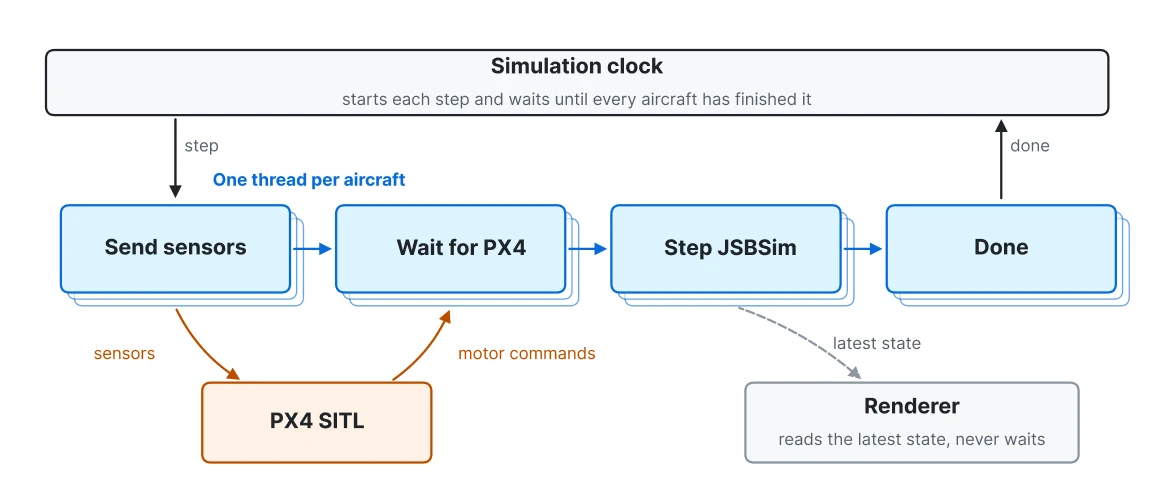
One physics step: each aircraft sends its sensors to PX4 and waits for the motor commands before JSBSim steps. The renderer only reads the latest state.
The ROS 2 interface works the same way as with Gazebo. PX4 connects on its usual simulator port, the Micro XRCE-DDS agent publishes the PX4 topics listed in its DDS config to ROS 2, and any ROS 2 tool can read them, Foxglove included. Camera images are sent by PteroSim over its own TCP stream, and a small bridge node turns them into ROS 2 images.
To check the flight model, I run NASA’s six-degree-of-freedom check cases in PteroSim’s tests. All eight atmospheric cases pass, each within twice the spread of NASA’s own reference simulations. A freely tumbling brick failed with JSBSim’s default rotational integrator, 0.184 deg/s off after 30 seconds, so our JSBSim fork now uses the implicit midpoint rule, which brings the error down to 0.0012 deg/s.
One flight model, several autopilots
Each aircraft has its autopilot set in its vehicle file: PX4, ArduPilot, or Betaflight. All three share one core. Physics runs at 240 Hz by default. Each sensor is sampled at its own rate: the IMU every step, the barometer and airspeed sensor every fourth step, and GPS at 10 Hz. The core stays in lockstep with the firmware and applies the actuator commands that come back. Only the connector is different for each autopilot.
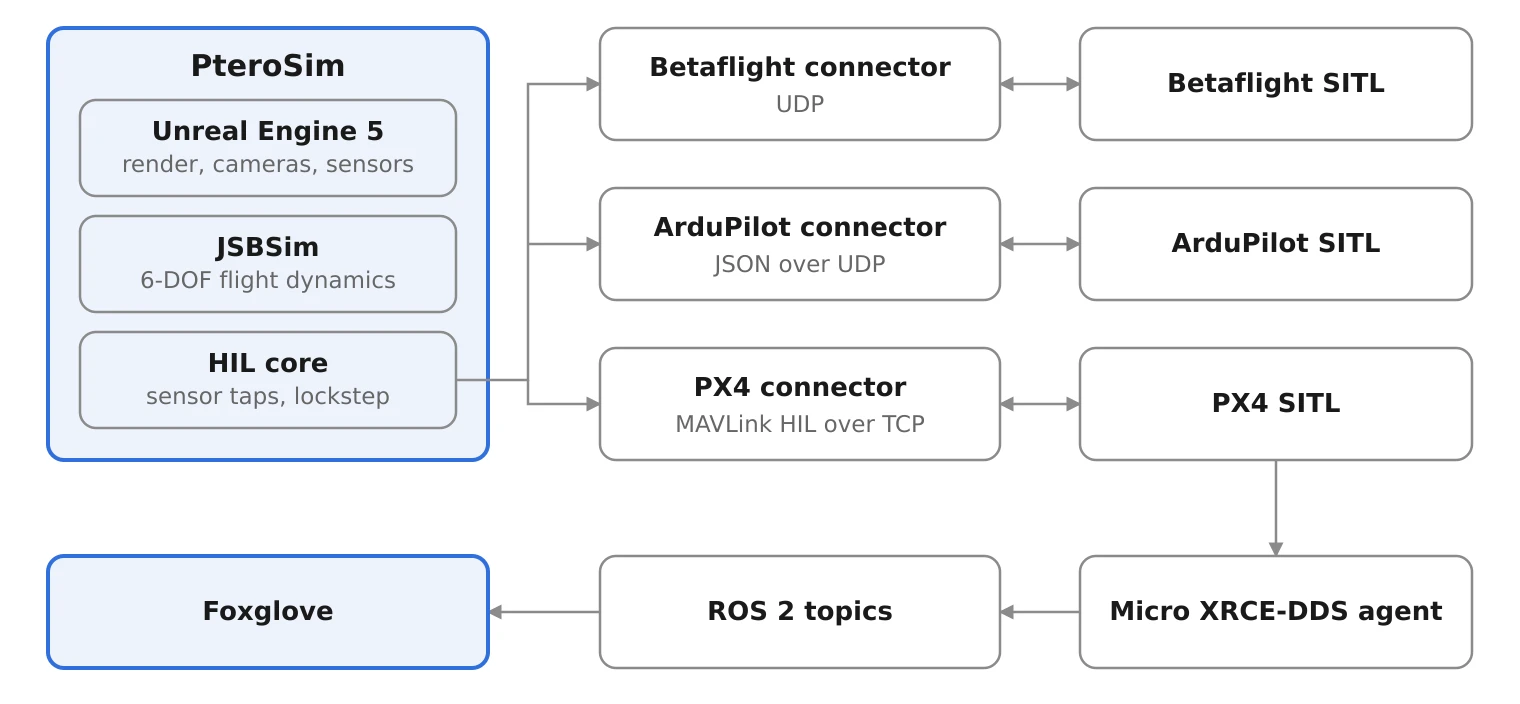
PteroSim talks to each autopilot’s SITL through its own connector. PX4’s topics reach Foxglove through the Micro XRCE-DDS agent and ROS 2.
PX4 gets MAVLink HIL messages over TCP on its standard simulator port. Each instance gets its own port, which is how eight PX4 drones fly in one scene.
ArduPilot uses its JSON SITL interface over UDP. Here PteroSim sends clean data, the true vehicle state, to which ArduPilot adds sensor noise and makes its own GPS message from it. With PX4, it is the other way round: PteroSim adds noise using values from real sensor datasheets, and PX4 uses the data as it comes. A full HIL mode for ArduPilot, where it gets already-noisy data through its hardware sensor drivers, is possible; however, it is not yet built, as I am not sure anyone needs it.
Betaflight, for FPV quads, has its own UDP protocol.
Bringing your own aircraft
Every time I needed to add my own aircraft to a simulator, it turned into a project of its own. Depending on the simulator, you had to know Unreal, write Gazebo plugins, or have experience building game mods, as with DCS or X-Plane.
In PteroSim, each aircraft is a JSBSim XML file plus a .glb mesh, loaded by the simulator at runtime.
If you have CFD results, you can put the coefficient tables into the XML, by hand or with an AI agent, to have them be picked up by the simulator.
After that, you can open the vehicle editor in the simulator. There you can look at the aero tables and plots, add or move a motor, move a landing gear leg or the mesh, and add a camera or another sensor, all without a restart.
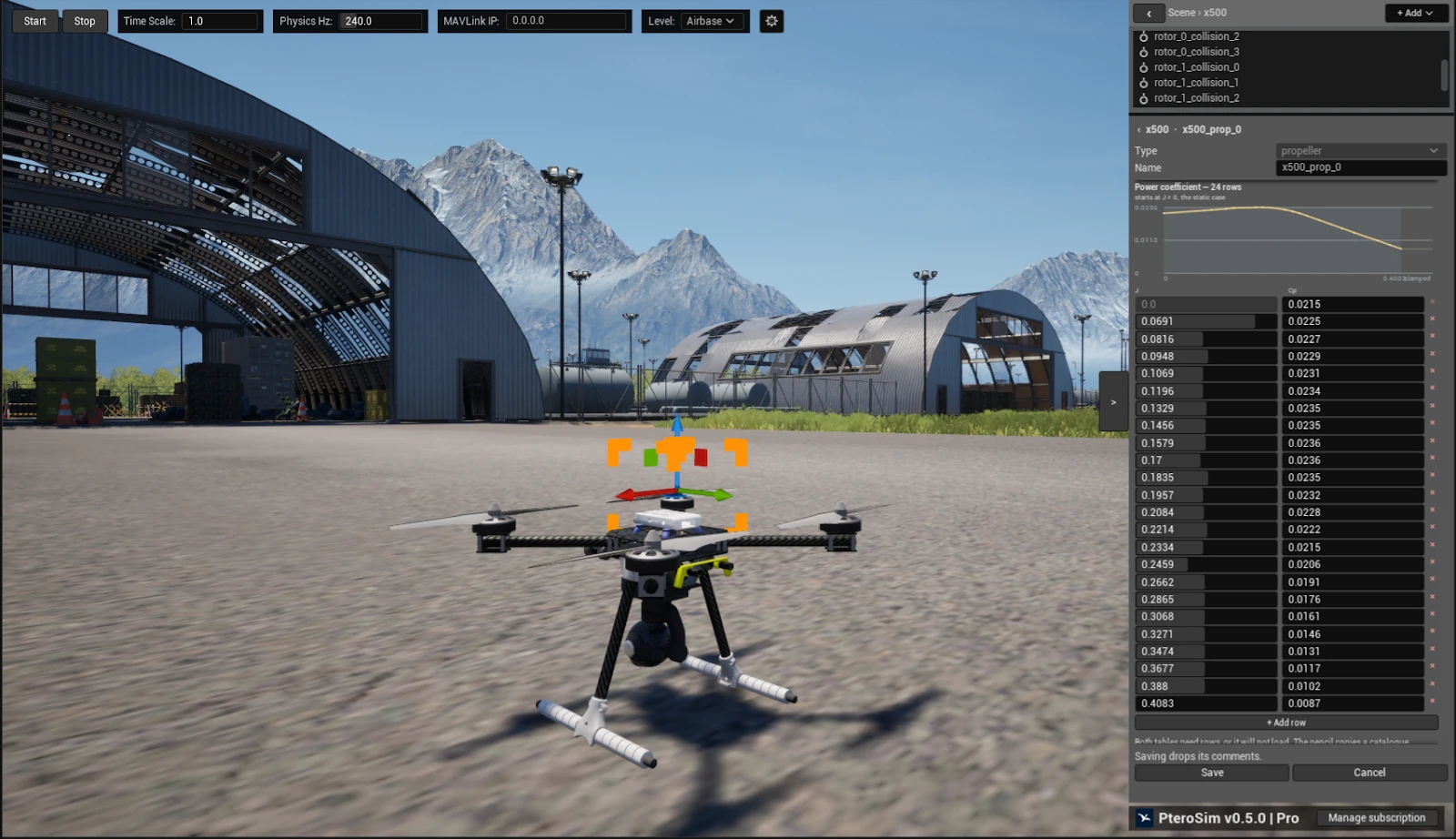
The vehicle editor: an X500 on the Airbase map, with its propeller’s power coefficient table and plot.
When the aircraft is ready, save it. You can open it in another scene, spawn several copies, and give each copy different sensors.
The forest demo
I didn’t write the swarm planner. XTDrone, an open-source project, ran EGO-Planner on PX4 in Gazebo with ROS 1 and MAVROS. In our fork of XTDrone, we’ve replaced that part with the ROS 2 branch of the EGO-Planner swarm and written a small package that connects it to PteroSim.
The planner talks to PX4 directly over uXRCE-DDS instead of MAVROS, sending position, velocity, acceleration, and yaw. The drones fly on their own PX4 EKF estimate instead of the simulator’s ground truth. EGO-Planner was reading the system clock in several places, so we patched it to follow the simulation clock. The planner also had to start only after takeoff: if it started before odometry arrived, it’d get stuck on “Depth Lost”.
The eight drones are one x500 vehicle file spawned eight times, each with its own PX4 SITL and one depth camera at 320x240 resolution, and a 30 Hz update rate. The planner gets nothing else about the forest and builds its map of the trees from the depth images.
I ran it on a laptop with an i9-14900HX and an RTX 4090 Laptop GPU. PteroSim alone ran the eight x500s with depth cameras in real time at about 34 FPS. With the full stack, including PX4 and ROS 2, it first ran at half real time, with the bottleneck on the WSL side, not the simulator. After we cut the PX4 topics sent over uXRCE-DDS down to the five the planner needs (vehicle_odometry at 50 Hz and vehicle_command_ack out of PX4; offboard_control_mode, trajectory_setpoint, and vehicle_command into it), the full stack ran in real time, with depth at 26 to 30 frames per second. In one run, all eight drones reached their goals in 83 seconds.
Watching the swarm in Foxglove
I chose Foxglove because it runs natively on Windows and Linux, so I could skip WSL setup for the visualization tool.
In the demo, you can see the depth images, each drone’s occupancy map, and all eight trajectories at once, and the depth view stays smooth. I can move panels into separate windows, show topics and FPS, and set up my own views.
The layout is a JSON file that is easy to read and edit, so I can ask an AI agent to move a panel, hide another, or add a plot. Foxglove picks up the change without a restart.
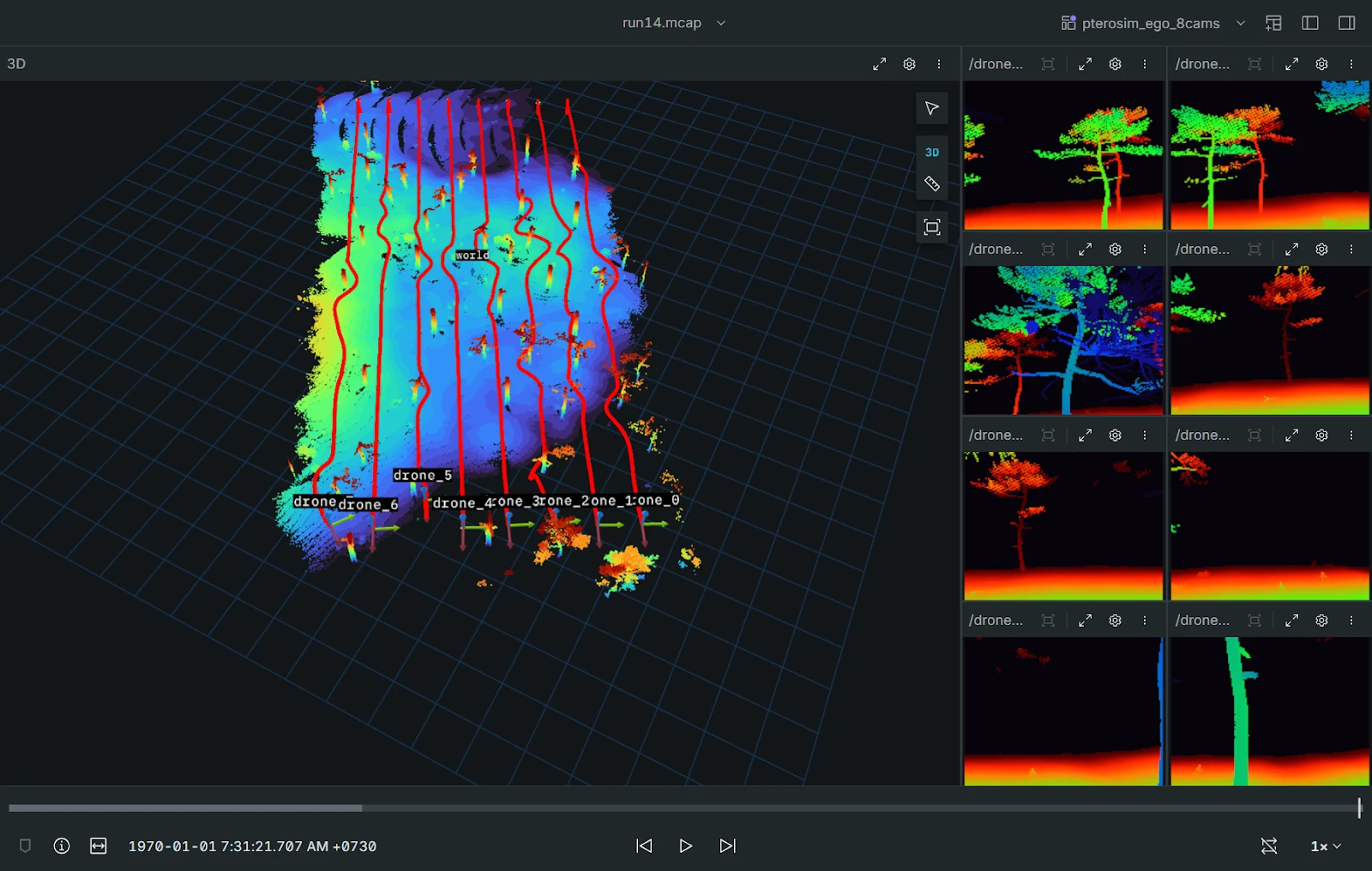
Foxglove at the end of the forest flight: the forest scanned by all eight drones and their paths in the 3D panel, the eight depth cameras on the right.
What’s next
Version 0.5.0 is out. You can now bring your own props into a scene with collisions; a drone can hit them or pick them up. The simulator also supports real-world terrain through Cesium and loading scenes from .pak files at runtime. The code in our XTDrone fork is ready to try. The forest in the video is a map from the Fab marketplace and doesn’t ship with PteroSim, but the swarm can fly on the maps that do, or on your own course: since 0.5.0, any 3D model can be loaded into a scene as a prop.
About the author
Alexander Kalmykov is the founder of PteroLabs and builds PteroSim. He has worked in robotics and simulation for more than eight years. With his team, he placed second in NASA’s Find Me on the Moon lunar navigation challenge and third in the NASA Space ROS Sim Summer Sprint, both in 2024.