Native Foxglove Visualization in LeRobot
Stream teleop, recording, and dataset playback from LeRobot straight into Foxglove without any code
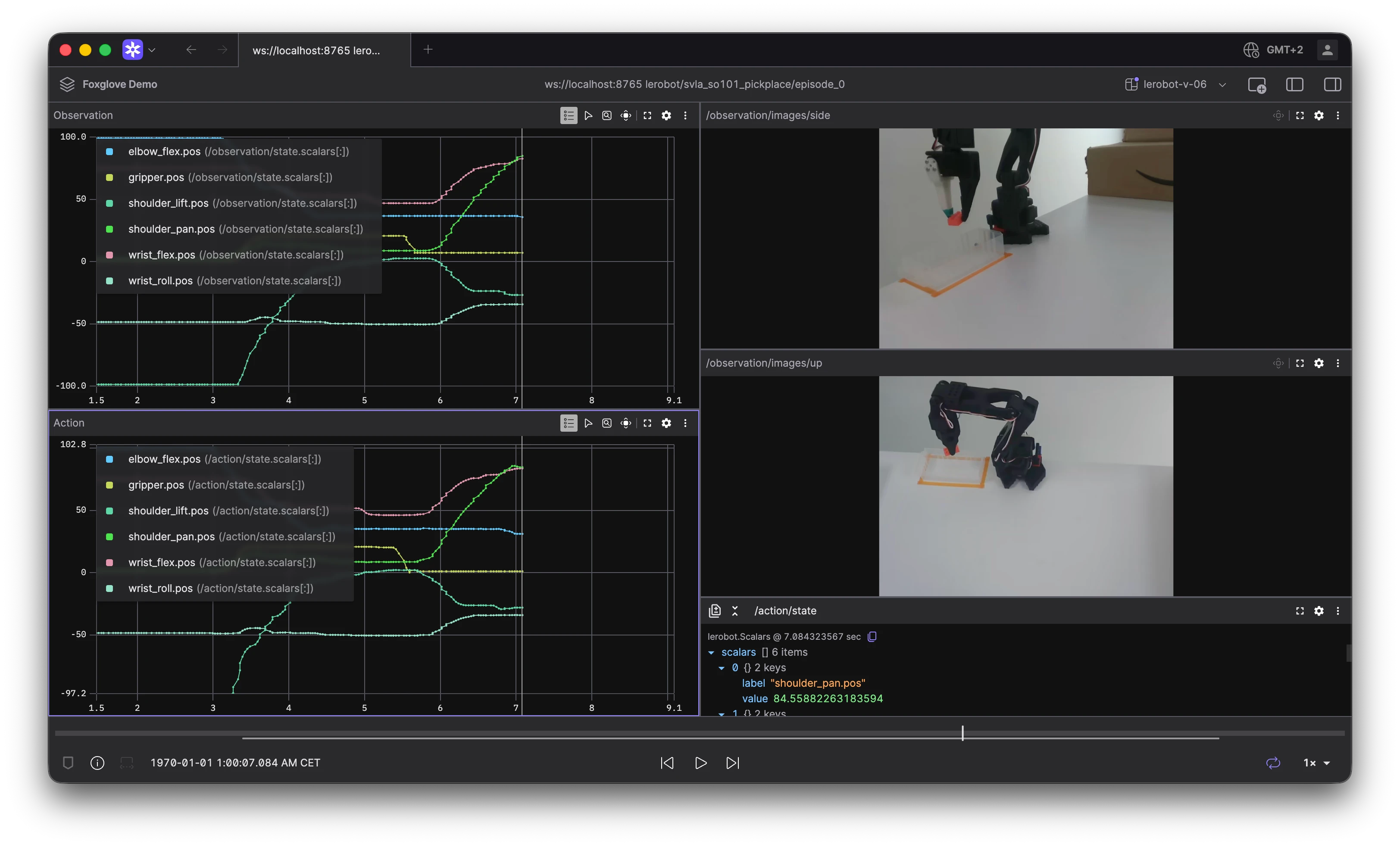
tl;dr LeRobot 0.6.0 ships native Foxglove support. Add --display_mode=foxglove to lerobot-teleoperate, lerobot-record, or lerobot-rollout to stream camera feeds and joint/action plots live over WebSocket. Replay any recorded dataset as a seekable timeline with lerobot-dataset-viz --display-mode foxglove. Connect the Foxglove app to ws://localhost:8765 and you’re done — no custom integration code required.
With PR #3902, Foxglove becomes a first-class visualization backend for LeRobot — selectable at runtime with a single flag. We are excited about this development and can’t wait to see how the community embraces simpler workflows.
Why Foxglove for LeRobot
LeRobot’s control loop produces a rich mix of data every timestep: per-motor joint positions, action targets, one or more camera images, and (optionally) depth maps. Foxglove’s multi-panel layouts let you see all of this side by side — camera feeds in Image panels, joint traces in Plot panels, all synced to the same timeline.
Three things make this integration useful for imitation learning workflows:
- Live feedback during teleop and recording. Spot a dead camera, a stuck joint, or a misaligned gripper before you’ve recorded fifty episodes. The Foxglove app updates in real time as you move the leader arm.
- Seekable dataset playback. Recorded episodes are served as a scrubbable timeline using Foxglove’s
PlaybackControlcapability. Play, pause, seek, and change speed — frames are read from the on-disk dataset on demand and stamped at their original timestamps. - Consistent topic layout across live and replay. Whether you’re streaming live or replaying a dataset, data appears on the same topics:
/observation/state,/action/state, and/observation/images/<camera>. Build a layout once and reuse it everywhere.
Under the hood, LeRobot uses the Foxglove SDK (foxglove-sdk>=0.25.1) to start a WebSocket server. Scalar features are published as typed JSON messages on a static lerobot.Scalars schema — a flat {label, value} array so every joint and action dimension is automatically named in Plot panels. Images are published as RawImage (or JPEG CompressedImage when compression is enabled).
Getting started
LeRobot requires Python 3.12+. We run it using uv, but conda is also supported.
uv venv --python 3.12
source .venv/bin/activate
uv pip install 'lerobot[feetech,dataset_viz]'
Refer to LeRobot Installation documentation for more information.
Connect Foxglove
- In the Foxglove app, select Open connection from the dashboard or left-hand menu.
- Choose Foxglove WebSocket and enter
ws://localhost:8765(the default bind address). - Start any LeRobot command with
--display_mode=foxglove(live) or--display-mode foxglove(dataset replay) — data appears as soon as the server starts. - Download our layout for LeRobot or create your own. We show you how to open a layout in Foxglove in this video.
Live teleoperation
The fastest way to see Foxglove in action is during teleoperation. Pass --display_data=true --display_mode=foxglove to lerobot-teleoperate and move the leader arm — camera feeds and joint plots update in the Foxglove app in real time.
uv run lerobot-teleoperate \
  --robot.type=so101_follower \
  --robot.port=/dev/tty.usbmodemFOLLOWER \
  --robot.id=my_follower \
  --robot.cameras="{ front: {type: opencv, index_or_path: 0, width: 640, height: 480, fps: 30}}" \
  --teleop.type=so101_leader \
  --teleop.port=/dev/tty.usbmodemLEADER \
  --teleop.id=my_leader \
  --display_data=true \
  --display_mode=foxglove
Replace the USB port paths with your actual device paths (find them with lerobot-find-port). Each motor’s position appears as a named series on /observation/state, and the teleoperator’s targets appear on /action/state. Camera frames stream to /observation/images/front.
Recording with live visualization
When collecting demonstration data, live visualization is invaluable for catching problems early. Add the same flags to lerobot-record, and you’ll see exactly what the dataset will contain as each episode is captured.
uv run lerobot-record \
  --robot.type=so101_follower \
  --robot.port=/dev/tty.usbmodemFOLLOWER \
  --robot.id=my_follower \
  --robot.cameras="{ front: {type: opencv, index_or_path: 0, width: 640, height: 480, fps: 30}}" \
  --teleop.type=so101_leader \
  --teleop.port=/dev/tty.usbmodemLEADER \
  --teleop.id=my_leader \
  --dataset.repo_id=${HF_USER}/foxglove-demo \
  --dataset.num_episodes=5 \
  --dataset.single_task="Pick up the cube" \
  --display_data=true \
  --display_mode=foxglove
The live Foxglove panel gives you instant feedback on camera framing, joint ranges, and action tracking — much easier than discovering a bad episode after recording dozens of them.
Seekable dataset playback
The most powerful part of this integration is dataset replay. lerobot-dataset-viz can serve any LeRobot dataset — from the Hugging Face Hub or recorded locally — as a seekable timeline in Foxglove. The playback bar drives play, pause, seek, and speed; frames are read from disk on demand and stamped at their original dataset timestamps.
# A public SO-101 pick-and-place dataset
uv run lerobot-dataset-viz \
  --repo-id lerobot/svla_so101_pickplace \
  --episode-index 0 \
  --display-mode foxglove

# A dataset you recorded locally
uv run lerobot-dataset-viz \
  --repo-id ${HF_USER}/foxglove-demo \
  --root ~/.cache/huggingface/lerobot/${HF_USER}/foxglove-demo \
  --episode-index 0 \
  --display-mode foxglove
This uses the same PlaybackControl capability described in our earlier post on local player integration. LeRobot advertises the episode’s time range, and the Foxglove app sends playback commands back to the server. A background thread reads frames from the on-disk dataset for whatever time you scrub to — no need to load the entire episode into memory upfront.
Dataset replay also publishes episode metadata (done, truncated, reward, success) on /episode/state, and uses the dataset’s feature metadata to label each scalar series with the correct joint names.
Policy rollout visualization
The same flags work for policy evaluation. When running lerobot-rollout, add --display_data=true --display_mode=foxglove to watch a trained policy execute in Foxglove — useful for comparing what the policy observes and commands against what you demonstrated during recording.
Tips and options
A few handy flags beyond the basics:
| Goal | Live commands (teleoperate / record / rollout) | Dataset replay (lerobot-dataset-viz) |
|---|---|---|
| JPEG-compress images | --display_compressed_images | --display-compressed-images |
| Custom port | --display_port=8766 | --web-port 8766 |
| Stream to another machine | --display_ip=0.0.0.0 | --host 0.0.0.0 |
| Don’t auto-play on connect | — | --no-autoplay |
When streaming to another machine, connect the Foxglove app to ws://<robot-ip>:8765 instead of localhost.
Depth images: if your robot has a depth camera, LeRobot handles it automatically. During live streaming, depth values are normalized for display contrast. During dataset replay, raw depth measurements are preserved so you can inspect the actual values.
Flag naming: live commands use underscores (--display_mode, --display_data) while lerobot-dataset-viz uses hyphens (--display-mode). This matches each tool’s CLI convention — just something to watch for when switching between workflows.
What’s next
LeRobot’s Foxglove integration covers the full imitation learning loop: teleoperate, record, replay, and evaluate — all through the same WebSocket topics and schemas. No need to roll it out yourself anymore.
To go further, check out the Foxglove SDK examples for building custom visualizations on top of LeRobot’s topic layout — like a live 3D kinematic model driven from joint positions.
Resources:
- LeRobot Foxglove visualization source
- LeRobot dataset visualization docs
- Foxglove PlaybackControl documentation
- Foxglove WebSocket connections
Download the latest Foxglove desktop app and try it with your LeRobot setup today. Join our Discord community or follow us on X and LinkedIn to stay up to date on all Foxglove releases.